
How to Reduce Photo and Signature Size in KB for Online Application Forms

Exam, job, scholarship, passport and bank forms often have strict rules like “Photo: JPG, 20–50 KB” or “Signature: 10–20 KB”. Phone photos are usually 2–5 MB, so they get rejected. Here’s how to get your photo and signature to the exact size — free and in a minute.
Always check the official notification of the form you are filling. Size limits, pixel sizes and background rules are different for every exam and website.
Typical requirements (examples)
| Item | Common size limits | Common format |
|---|---|---|
| Passport-size photo | 20–50 KB, sometimes up to 100–200 KB | JPG |
| Signature | 10–20 KB, sometimes up to 50 KB | JPG |
| Certificates / documents | 100 KB – 1 MB | JPG or PDF |
Step 1 – Take a good photo
- Stand against a plain white or light background.
- Face the camera, good daylight, no shadows on the face.
- For signatures: sign with a black or blue pen on white paper, and photograph it from straight above.
Step 2 – Crop it
Use Crop Image to cut away extra background. For passport-style photos, choose a ratio close to the form’s (many use 3.5 × 4.5, which is close to 3:4). For signatures, crop tightly around the ink.
Step 3 – Reduce the size in KB
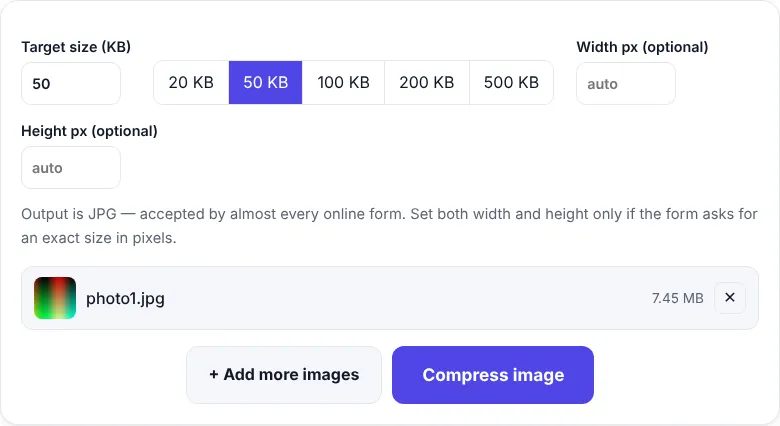
- Open Reduce Image Size in KB.
- Choose your photo or signature.
- Type the target size (e.g. 50) or tap 20 / 50 / 100 / 200 KB.
- If the form asks for exact pixels (e.g. 200 × 230), type the width and height.
- Click Compress and download.
The tool tries the highest quality that fits your target and only reduces pixels if it really has to — so your photo stays as clear as possible.
Shortcuts: 20 KB · 50 KB · 100 KB · 200 KB
Minimum size too?
Some forms say “between 20 KB and 50 KB”. If your result is below the minimum, set a target closer to the upper limit (e.g. 45 KB), or increase the pixel size slightly.
Common reasons photos get rejected
| Problem | Fix |
|---|---|
| File too large | Reduce the KB target |
| Wrong format (PNG/HEIC) | The tool always outputs JPG |
| Wrong pixel size | Enter exact width and height |
| Blurry face | Use a sharper original photo, crop before compressing |
| Coloured or dark background | Retake the photo against a light wall |
iPhone photos (HEIC)
iPhones often save photos as HEIC. Our KB tools accept HEIC directly and save JPG. You can also convert with HEIC to JPG, or change Settings → Camera → Formats → Most Compatible so new photos are saved as JPG. See also: passport size photo for online forms.
Compressing a signature (step by step)
- Sign 2–3 times on plain white paper with a black or dark-blue pen and pick the best one.
- Take a photo straight from above in daylight, without shadows.
- Crop tightly around the signature with Crop Image. Many forms want a wide shape, roughly 3:1.
- Open Compress Image to 20KB (or the limit your form asks for) and compress.
- Zoom in on the result — the signature should be clear and dark, with a white background.
Reducing size without losing quality
- Crop first. Removing extra background reduces the file size a lot.
- Use the exact pixels the form asks for. A 200 × 230 px photo easily fits in 20–50 KB with high quality.
- Start from a sharp photo. Compression can’t fix blur.
- Don’t compress twice. Always start again from the original photo if you need a different size.
Photo size in KB vs size in pixels vs size in cm
Forms mix these up, so it helps to know the difference:
| Term | Meaning | Example |
|---|---|---|
| KB (file size) | How much storage the file uses | 45 KB |
| Pixels | Width × height of the image | 200 × 230 px |
| cm / inches | Printed size, depends on DPI | 3.5 × 4.5 cm |
A printed 3.5 × 4.5 cm photo at 200 DPI is about 276 × 354 pixels. If a form only gives centimetres, you can calculate pixels as cm ÷ 2.54 × DPI.
Frequently asked questions
How do I reduce a photo to 50 KB?
Open Compress Image to 50KB, choose your photo and click Compress. The tool finds the best quality that fits in 50 KB.
How do I make a signature 20 KB or less?
Photograph or scan your signature on white paper, crop it closely with Crop Image, then use Compress Image to 20KB.
My form needs 200 × 230 pixels. Can I set that?
Yes. In Reduce Image Size in KB, type the width and height. The photo is cropped from the centre to that exact size and compressed to your KB target.
Why was my photo rejected even though it was under the size limit?
Forms also check format (usually JPG), pixel dimensions, background colour and how clearly your face is visible. Read the official notification carefully.


