
Passport Size Photo for Online Forms in India – Size in cm, Pixels and KB

“Upload a recent passport-size photograph” — almost every Indian application form asks for it: exams, jobs, bank accounts, admissions, scholarships and many government services. But the rules about size in cm, pixels and KB can be confusing. This guide explains them simply and shows how to prepare the photo for free.
Rules differ between portals. Always read the official instructions of the form you are filling. Use the numbers below as a starting point.
Passport size in cm, mm and inches
The common passport-size photo in India is:
| Unit | Size |
|---|---|
| Centimetres | 3.5 × 4.5 cm |
| Millimetres | 35 × 45 mm |
| Inches | about 1.38 × 1.77 in |
| Pixels at 300 DPI | about 413 × 531 px |
| Pixels at 200 DPI | about 276 × 354 px |
Some online portals ask for a different digital size — for example a square photo or a specific pixel size. If the form gives pixels, use exactly those.
How to convert cm to pixels
pixels = cm ÷ 2.54 × DPI
Example at 300 DPI: 3.5 cm ÷ 2.54 × 300 ≈ 413 px; 4.5 cm ÷ 2.54 × 300 ≈ 531 px.
Typical KB limits
Online forms limit the file size too, for example:
| Form type | Typical photo limit |
|---|---|
| Competitive exams | often 20–50 KB |
| Job and bank applications | often 20–100 KB |
| Other government portals | often up to 100–300 KB |
Some forms also have a minimum (for example “at least 20 KB”), so a very small file can be rejected too.
What makes a good passport photo
- Plain white or light background, no patterns or shadows.
- Face straight to the camera, both ears visible if possible, eyes open, neutral expression.
- Face fills about 60–75% of the photo height.
- Even light, no harsh shadows; no filters or beauty effects.
- Recent photo; glasses only if the rules allow them, and without glare.
Step-by-step: prepare your photo for free
- Take the photo against a light wall in daylight, from about 1–1.5 m away.
- iPhone photo in HEIC? Convert it with HEIC to JPG.
- Crop with Crop Image. For 3.5 × 4.5 cm, use the 3:4 ratio (close to 35:45) and keep head and shoulders centred.
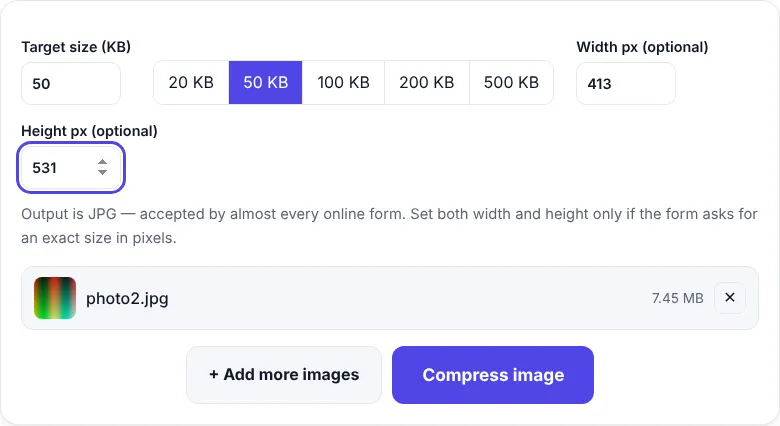
- Set size and KB: open Reduce Image Size in KB, type the target (e.g. 50 KB) and the pixels the form asks for (e.g. 413 × 531), then click Compress.
- Check the downloaded JPG: face sharp, background clean, size under the limit.
Shortcuts: Compress to 20 KB · 50 KB · 100 KB
Printing passport photos at home
If you need prints, place several 3.5 × 4.5 cm photos on an A4 page in any document editor, set the image size in cm, and print on photo paper at 100% scale (“actual size”). Make sure the printer doesn’t “fit to page”, or the size will change.
Why photos get rejected
| Reason | Fix |
|---|---|
| File too large or too small | Change the KB target |
| Wrong format (PNG/HEIC) | Our tools save JPG |
| Wrong pixel size | Type the exact width and height |
| Face too small / too large | Crop again with more or less margin |
| Dark or coloured background | Retake against a light wall |
| Blurry | Use a sharper original; don’t compress twice |
Keep a master copy
Save one high-quality, uncompressed photo of yourself. Every time a form asks for a different size, make a new copy from the master — never re-compress an already small file.
Frequently asked questions
What is passport size photo size in India?
The common passport-size photo in India is 3.5 cm wide × 4.5 cm high (35 × 45 mm). Some online portals ask for a different digital size, such as a square photo, so always follow the instructions of the form you are filling.
How many pixels is 3.5 × 4.5 cm?
About 413 × 531 pixels at 300 DPI, or 276 × 354 pixels at 200 DPI.
How do I make my photo 50 KB?
Crop the photo to the right shape, then use Compress Image to 50KB or Reduce Image Size in KB with 50 as the target.
Can I use a selfie?
Only if it meets the rules: face straight to the camera, plain light background, even light and no filters. A photo taken by someone else from about 1–1.5 metres usually looks better.


