
How to Merge PDF Files into One – Windows, Mac, Android & iPhone

Sending one tidy PDF is much better than five separate attachments — for job applications, visa documents, invoices or project reports. Here’s how to merge PDF files on any device, free.
The quickest way (any device)
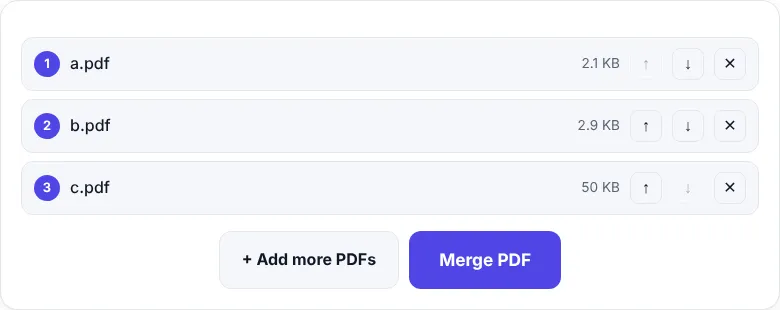
- Click Choose PDF files and select all the PDFs (hold Ctrl on Windows or Cmd on Mac to pick several). You can also drag them in.
- Put them in the right order with the ↑ ↓ arrows. Click ✕ to remove one.
- Click Merge PDF.
- Click Download PDF.
On Windows
Windows has no built-in “merge PDF” button, so most people install heavy software just for this. You don’t need to:
- Open Edge or Chrome.
- Go to zentapdf.com/merge-pdf/.
- Drag PDFs from File Explorer into the box and follow the steps above.
On Mac
macOS can merge PDFs in Preview (open one PDF, show thumbnails, and drag other PDFs into the sidebar). It works, but ordering many files is fiddly. A browser tool is often faster: open Merge PDF in Safari or Chrome and drag the files in from Finder.
On Android
- Open Chrome and go to zentapdf.com/merge-pdf/.
- Tap Choose PDF files and select the files from Downloads or Files.
- Arrange, merge and download. The merged PDF appears in your Downloads folder.
On iPhone and iPad
- Open Safari and go to zentapdf.com/merge-pdf/.
- Tap Choose PDF files → Browse and pick files from the Files app.
- Merge and download. Tap the download icon to open the PDF, then Share to send it or save it to Files.
Getting the order right
- Rename files first with numbers, for example
1-cover.pdf,2-resume.pdf,3-certificates.pdf. They’ll appear in that order when you select them. - Need to move individual pages, not whole files? Merge first, then use Reorder Pages to drag pages around.
- Got an extra blank page? Delete it with Remove Pages.
Merged file too big?
Merging adds the sizes together. If the result is too large to email or upload, run it through Compress PDF — PDFs with scans or photos often shrink by 50–90%.
Merging photos and PDFs
Got photos of certificates as JPGs? Convert them first with JPG to PDF, then merge that PDF with the rest.
Merging scanned documents
If you scanned pages one by one with your phone, you might have many small PDFs or images. The easiest flow is:
- Turn photos into a PDF with Images to PDF (or JPG to PDF).
- Merge it with any other PDFs in Merge PDF.
- Fix any sideways pages with Rotate PDF.
- Make the final file smaller with Compress PDF.
Tips for job and visa applications
- Follow the order the form asks for — for example application form, ID, education certificates, experience letters.
- Put a cover or index page first if you’re sending many documents.
- Check the size limit before uploading; many portals accept only 1–2 MB.
- Name the file clearly, like
Priya-Sharma-Application.pdf.
Does merging reduce quality?
No. Merge PDF copies each page exactly as it is — text stays selectable, images keep their quality and links keep working. Only bookmarks (the outline panel) from the original files are not carried over.
Common problems
| Problem | Solution |
|---|---|
| “This PDF is password-protected” | Unlock it first with Unlock PDF using the password you know |
| Pages are sideways | Fix them with Rotate PDF |
| Phone is slow with huge files | Merge on a computer, or compress the files first |
Merging PDFs should take seconds, not software installs. Now it does.
Frequently asked questions
How do I merge PDF files for free?
Open ZentaPDF Merge PDF, add your PDFs, arrange them in order and click Merge PDF. It is free, needs no sign-up and adds no watermark.
Does Windows have a built-in way to merge PDFs?
Windows does not include a PDF merge feature. The easiest free way is a browser tool like ZentaPDF Merge PDF, which works in Edge or Chrome without installing anything.
How many PDFs can I merge at once?
There is no fixed limit. Dozens of files or several hundred pages are fine on a normal computer.
Can I merge images and PDFs together?
First turn the images into a PDF with JPG to PDF, then merge that PDF with your other files.


